So, I went to the Tesla Model S beta event

Somewhere in August I got a invitation of Tesla to come over to the factory in Fremont California and see the Model S in person.

As a reservation holder of a Model S I simply could not refuse that invitation! Lucky me I still had some business to do in California and I had a paintball tournament there, a bit of travelling through the USA and I could attend the event, yay!

I did not know what to expect, but I expected something big. Tesla is not investing in any form of promotion of their Model S, but they seem to solely rely on the product promoting itself and using modern techniques like Facebook and Twitter. I saw myself as a ‘messiah’ (Ok, that is dramatized!) for Tesla, they would rely on us to overload the world with Tweets and messages with Facebook. Tempting and convincing other people to also make a reservation for the Model S.

My colleague (The Roadster owner) and I stayed in San Francisco to check out the area but also to be close to Fremont!

Driving towards the factory we did not know what to expect. How big is the factory? How many Model S’es will there be? How long wil the test drive be? (I knew that I would not be driving myself).

Arriving at the factory is impressive, it’s HUGE! The first thing you see is the big T-E-S-L-A sign on the outer wall.

The Tesla factory in Fremont

We parked the car and walked to the entry, have to say, that was the longest walk ever over a parking lot!

Once inside the first thing we saw was a clay model of the Model S, one half brown, the other one silver.

A clay model of the Model S

Seeing that model shows you how big the S is. At first Tesla said it would be the size of a BMW 5-series, well, it’s more like a 7-series!

Further down in the factory there was the ‘exploded body’ of the Model S and a chassis with battery and drive-train in it. This gave a good impression of the storage capacity the S has, but also how small the drivetrain actually is. I’ve seen it on multiple pictures, but seeing in for real is something different. A real piece of modern engineering!

Me at the exploded Model S
The Model S chassis

Standing at the chassis I turned around and saw the final assembly, a smooth white factory hall with all these red machines, really in Tesla style!

Final assembly of the Model S

From there one we walked over to the tour check-in, here we got a 90 minute tour around the still work in progress factory. Stamping, painting, plastic moulding and more, really cool to see the birth place of your future piece of modern engineering!


I was so impressed that I sometimes forgot to take pictures! But there are many pictures of this great event floating around on the internet, for example the Picasa album of Ben Goodwin.

Being done with the factory tour it was time for the speech of Elon Musk! He came driving on stage in the red Model S with a total of 8 persons + luggage in it! Have to say, one person was hidden in the “frunk” and in the back jumpseats were two kids!

Elon seemed to be a bit overwhelmed about the presence of so much (about 2.000) future Model S owners. He gave a quick demonstration of the Model S and gave a short talk, which both seemed to be completely improvised and not studied. I liked that, no standard talk, but something that came to mind the moment he was on stage! He even forgot the announcement of the Model S sport! George Blankenship had to call everybody back to get the announcement out. 4.5 sec from 0 – 96 km/h, wauw!

After Elon’s talk it was time to head outside to the area where the rides were being given. We had a slot between 22:00 and 22:30, but it was barely 21:00 at that time, so we had some time to grab a bit, drink a beer and just watch the three S’es driving around. I preferred the white one and that was exactly the on I got my ride in!

Two beers and some chats later it was time for our test drive! I called shotgun on the front seat, but one of the two persons in front of me was Elon’s son, so no need for that. But another car pulled up early, so I eventually got into the middle backseat of the white one. No problem! More than enough space and a great view on the interior and that MASSIVE 17″ central touch screen!

The ride itself was short, to short for me, but I get why. They had only 3 cars and 2.000 attendees to satisfy. I’d like to see it different, but I understand the how and why.

We did a short slalom and a acceleration demonstration on the straight. With 5 persons in the car it didn’t take long to reach 73mph before we had to slow down. No, it’s not as fast as a Roadster, but definitely faster than any other sedan I’ve ever driving! (Which are quite a few descent cars).

After the test-ride we exited the area through a tent where a demo of the central screens functions was being displayed and we saw the new charging connector and “UMC” for the Model S.

Tesla choose to design a new connector which was able to handle both 20kW AC charging as well as 90kW DC charging over the same pins. As a European I asked about the 3-phase support for the Model S and I got a disappointing answer, it’s not present.. I had a (and really good!) discussion with some Tesla employees about this matter. Well, it seemed we disagreed on that. So I started a petition to convince Tesla otherwise.

My final conclusion about the Model S? Full of gadgets, smooth and gorgeous! For me this is how automotive transportation should be. I’ve been hating the in-car systems for the last few years. They always to lacked features and we waaaaaaay behind on what is possible. I’ve driving Audi, Mercedes, BMW and Toyota, but all their systems seemed like they were build in 2000! The Model S however is cutting edge!

I didn’t have the time to play with the system, but from Elon’s demonstration and the other things I saw that night it proofed to me that the Model S will not only be a EV, but it will be my new mobile office! More than enough space, the world at your fingers through the 3G (maybe 4G) connectivity of the car and all that in a luxurious and spacious vehicle.

Of course, there still is work to do for Tesla. But hey, the vehicles were called “betas” for a reason. I work in IT and know what the words “Alpha” and “Beta” mean. As soon as they start using “RC” we can start judging on the finished touches!

The event itself was well prepared and organized. More than enough snack (good ones!) and drinks available and enough Tesla staff to bother will the dozens of questions I had.

I can’t wait any more! I feel like a little kid who wishes at the end of his birthday that he can sleep for a year, so it’s his birthday again the next day 😉

I don’t want to sound like a fanboy (but I guess I do…), but Tesla is really showing some awesome work here. The Model S is simply more than a car, it’s a experience.


For some more pictures of the event check out the already mentioned Picasa album of Ben Goodwin or check out the Tesla Motors Club forum. The last one contains much, much, much more information gathered at the event, as well more pictures and videos of the event.
Failover with Nexenta, NFS and the RSF-1 plugin

The title might seem a bit cryptic, but this post is about a High Available Nexenta cluster with the RSF-1 we are deploying.

While we are waiting for the moment where we can start using Ceph we are implementing new storage for our hosting clusters. Our current Linux machines with LVM and XFS are not up to the task anymore.

After some testing and discussing we chose to use Nexenta. What Nexenta is and how awesome ZFS is can be found on other places on the net, I’m not going to discuss that here.

I wanted to publish our findings about the HA plugin and NFS.

In short, we have two headends connected with two SAS JBOD’s. The RSF-1 plugin makes sure the ZPOOL is imported on one headend at the time. If one headend fails, the plugin automatically fails the pool over to the other headend.

The plugin provides one HA IP which is shared between the headends, you probably get the point.

We’ve been doing some testing and noticed that when we mount NFS (v3) over TCP the failover takes a staggering 6 minutes! Well, the failover doesn’t take 6 minutes, but that’s the time it takes for the TCP connections to recover.

When mounting over UDP the service is continued in 50 seconds, so that’s a big difference!

Some testing showed that this is due to the following kernel settings:

net.ipv4.tcp_retries1 = 3
net.ipv4.tcp_retries2 = 15

This page explains what those two values actually control.

We’ve been experimenting with those values and lowering retries1 to 1 gave us the same recovery times as with UDP, but sometimes the recovery would still take 6 minutes..

For now I advise to use NFS with UDP (which gives better performance anyway), but if you need to use TCP for some reason try fiddling with these values.

Distributed storage under Linux, is it there yet?

When it comes down to storage under Linux you have a lot of great options if you are looking for local storage, but what if you have so much data that local storage is not really an option? And what if you need multiple servers accessing the data? You’ll probably take NFS or iSCSI with a clustered filesystem like GFS or OCFS2.

When using NFS or iSCSI it will come down to one, two or maybe three servers storing your data, where one will have a primary role for 99.99% of the time. That is still a Single Point-of-Failure (SPoF).

Although this worked (and still is) fine, we are running into limitations. We want to store more and more data, we want to expand without downtime and we want expansion to go smoothly. Doing all that under Linux now is a ……. Let’s say: Challenge.

Energy costs are also rising, if you like it or not, it does influence the work of a system administrator. We were used to having a Active/Passive setup, but that doubles your energy consumption! In large environments that could mean a lot of money. Do we still want that? I don’t think so.

Distributed storage is what we need, no central brain, no passive nodes, but a fully distributed and fault tolerant filesystem where every node is active and it has to scale easily without any disruption in service.

I think it’s nearly there and they call it Ceph!

Ceph is a distributed file system build on top of RADOS, a scalable and distributed object store. This object store simply stores objects in pools (which some people might refer to as “buckets”). It’s this distributed object store which is the basis of the Ceph filesystem.

RADOS works with Object Store Daemons (OSD). These OSDs are a daemon which have a data directory (btrfs) where they store their objects and some basic information about the cluster. Typically a data directory of a OSD is a one hard disk formatted with btrfs.

Every pool has a replication size property, this tells RADOS how many copies of an object you want to store. If you choose 3 every object you store on that pool will be stored on three different OSDs. This provides data safety and availability, loosing one (or more) OSDs will not lead to data loss nor unavailability.

Data placement in RADOS is done by CRUSH. With CRUSH you can strategically place your objects (and it’s replica’s) in different rooms, racks, rows and servers. One might want to place the second replica on a separate power feed then the primary replica.

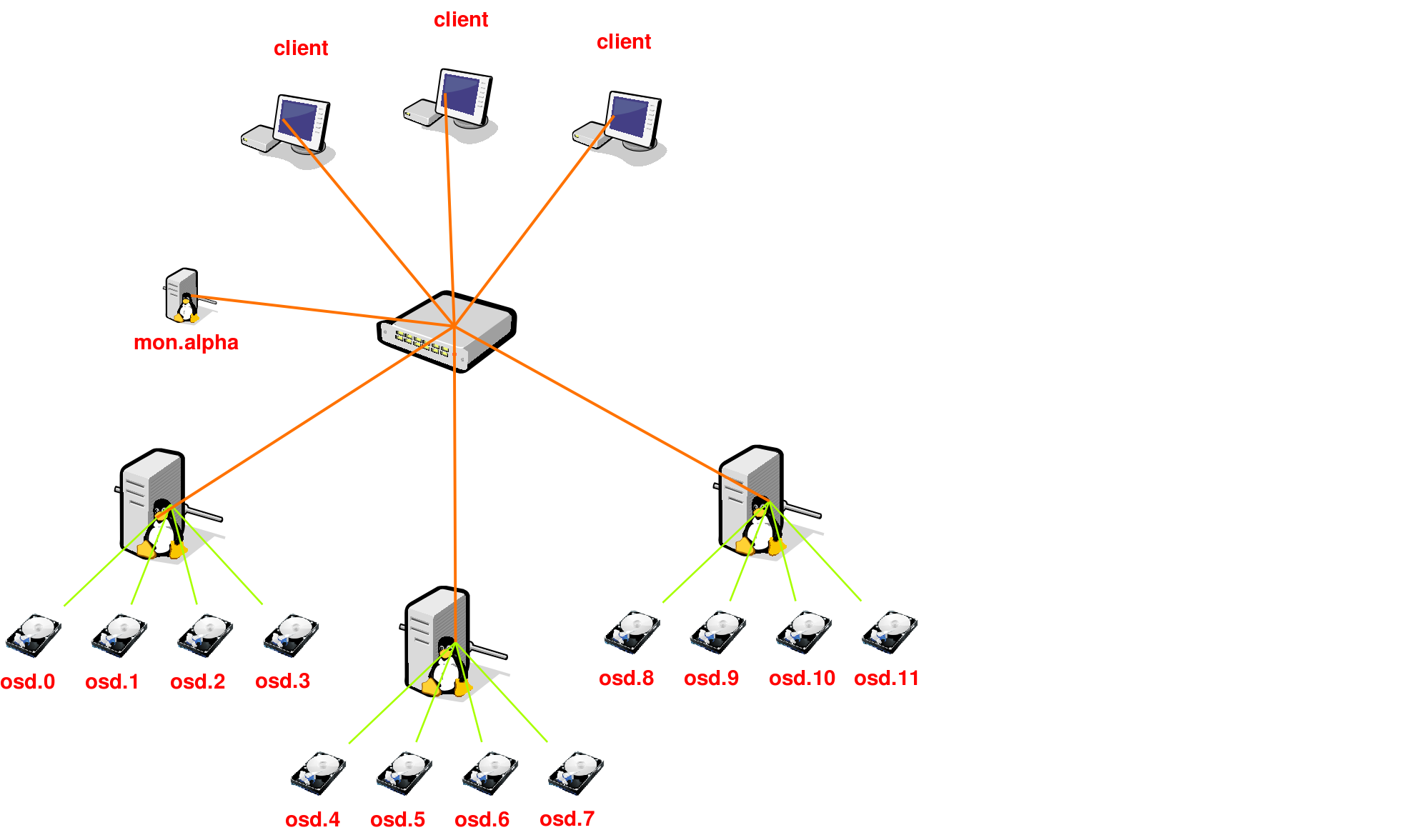
A small RADOS cluster could look like this:

This is a small RADOS cluster, three machines with 4 disks each and one OSD per disk. The monitor is there to inform the clients about the cluster state. Although this setup has one monitor, these can be made redundant by simple adding more (odd number is preferable).

With this post I don’t want to tell you everything about RADOS and the internal working, all this information is available on the Ceph website.

What I do want to tell you is how my experiences are with Ceph at this point and where it’s heading.

I started testing Ceph about 1.5 years ago, I stumbled on it when reading the changelog of 2.6.34, that was the first kernel where the Ceph kernel client was included.

I’m always on a quest to find a better solution for our storage, right now we are using Linux boxes with NFS, but that is really starting to hurt in many ways.

Where did Ceph get in the past 18 months? Far! I started testing when version 0.18 just got out, right now we are at 0.31!

I started testing the various components of Ceph, started on a small number of virtual machines, but currently I have two clusters running, a “semi-production” where I’m running various virtual machines with RBD and Qemu-KVM. My second cluster is a 74TB cluster with 10 machines, each having 4 2TB disks.

Filesystem            Size  Used Avail Use% Mounted on
[2a00:f10:113:1:230:48ff:fed3:b086]:/   74T  13T   61T  17% /mnt/ceph

As you can see, I’m running my cluster over IPv6. Ceph does not support dual-stack, you will have to choose between IPv4 or IPv6, where I prefer the last one.

But you are probably wondering how stable or production ready it is? That question is hard to answer. My small cluster where I run the KVM Virtual Machines (through Qem-KVM with RBD) has only 6 OSDs and a capacity of 600GB. It has been running for about 4 months now without any issues, but I have to be honest, I didn’t stress it either. I didn’t kill any machines nor did hardware fail. It should be able to handle those crashes, but I haven’t stressed that cluster.

The story is different with my big cluster. In total it’s 15 machines, 10 machines hosting a total of 40 OSDs, the rest are monitors, meta data servers and clients. It started running about 3 months ago and since I’ve seen numerous crashes. I also chose to use the WD Green 2TB disks in my cluster, that was not the best decision. Right now I have a 12% failure rate of these disks. While the failure of those disks is not a good thing, it is a good test for Ceph!

Some disk failures caused some serious problems causing the cluster to start bouncing around and never recovering from that.. But, about 2 days ago I noticed two other disks failing and the cluster fully recovered from it while a rsync was writing data to it. So, it seems to be improving!

During my further testing I have stumbled upon a lot of things. My cluster is build with Atom CPU’s, but those seem to be a bit underpowered for the work. Recovery is heavy for OSDs, so whenever something goes wrong in the cluster I see the CPU’s starting to spike towards the 100%. This is something that is being addressed.

Data placement goes in Placement Group’s, aka PGs. The more data or OSDs you add to the cluster, the more PGs you’ll get. The more PGs you have, the more memory your OSDs start to consume. My OSDs have 4GB (Atom limitation) each. Recovery is not only CPU hungry, but it will also eat your memory. Although the use of tcmalloc reduced the memory usage, OSDs sometimes use a lot of memory.

To come to some sort of a conclusion. Are we there yet? Short answer: No. Long answer: No again, but we will get there. Although Ceph still has a long way to go, it’s on the right path. I think that Ceph will become the distributed storage solution under Linux, but it will take some time. Patience is the key here!

The last thing I wanted to address is the fact that testing is needed! Bugs don’t reveal themselves you have to hunt them down. If you have spare hardware and time, do test and report!