Using L3 (BGP) routing for your Ceph storage

Many Ceph storage environments out there are deployed using a L2 underlay.

This means that the Ceph servers (MON, OSD, etc) are connected using LACP/Bonding to a pair of switches. On their ‘bond0’ device (example) they are assigned an IPv4/IPv6 address and this is used for connectivity between the Ceph nodes and the Ceph clients.

Although this works fine, I try to avoid L2 as much as possible in datacenter deployments. L2 scales up to a certain point, but it has it’s limitations. Modern Top-of-Rack (ToR) switches can easily route traffic and wire-speed. This used to be a limitation of switches in the past. When designing environments I prefer using a L3 approach.

This blogpost is there to show you the rough concept. It’s NOT a copy and paste tutorial. You will need to adapt it to your situation.

Network setup and BGP configuration

Using Juniper QFX5100 switches and Frrouting on the Ceph nodes I’ve established BGP sessions between the ToR and Ceph nodes according to the diagram below.
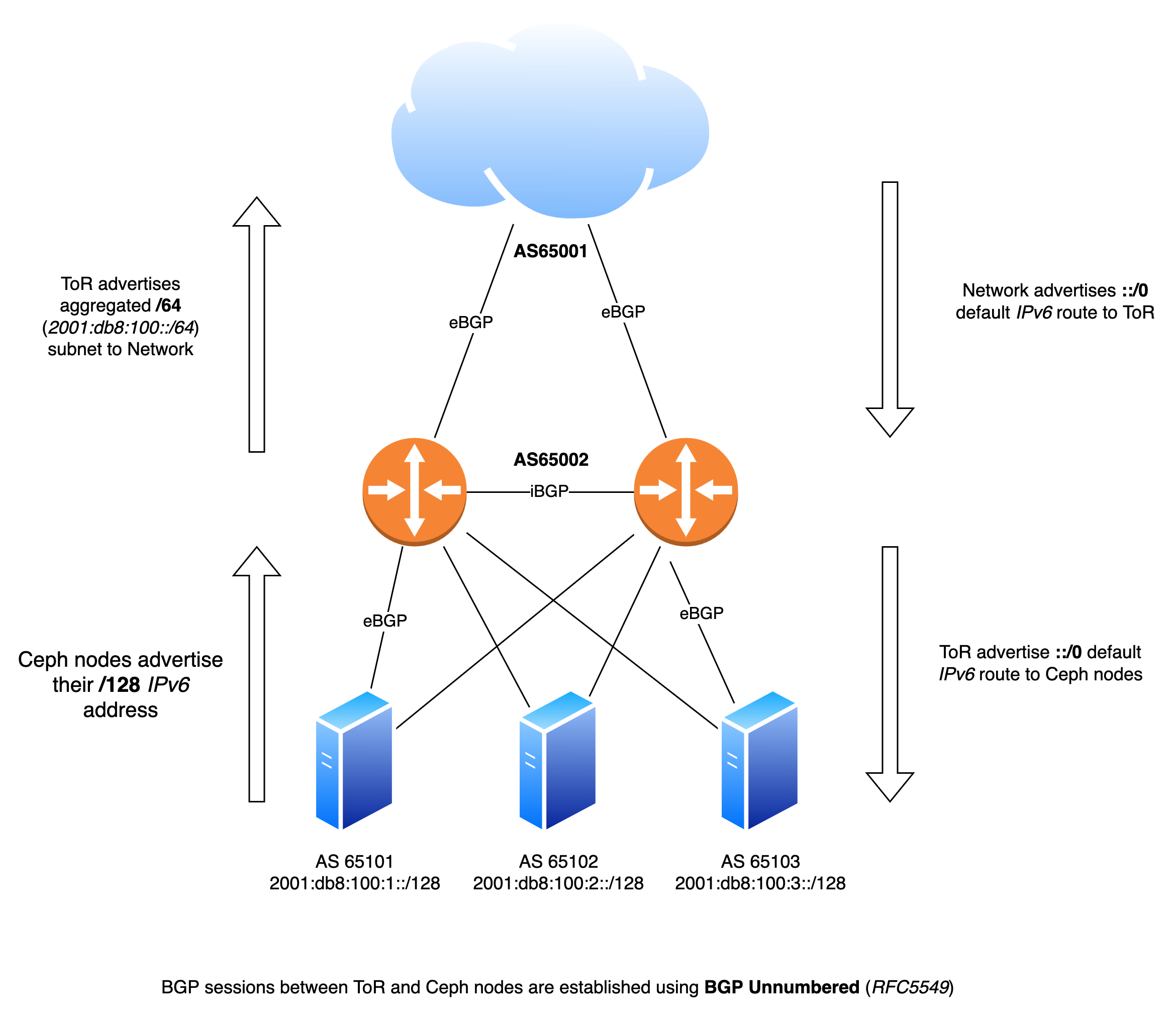
Each nodes has two independent BGP sessions with the Top-of-Rack in it’s rack. Via these BGP sessions they advertise their local IPv6 /128 address. Via the same sessions they receive a default ::/0 IPv6 route.

ceph01# sh bgp summary 

IPv6 Unicast Summary (VRF default):
BGP router identifier 1.2.3.4, local AS number 65101 vrf-id 0
BGP table version 10875
RIB entries 511, using 96 KiB of memory
Peers 2, using 1448 KiB of memory
Peer groups 1, using 64 bytes of memory

Neighbor        V    AS   MsgRcvd   MsgSent   TblVer  InQ OutQ  Up/Down State/PfxRcd   PfxSnt Desc
enp196s0f0np0   4 65002    487385    353917        0    0    0 3d18h17m            1        1 N/A
enp196s0f1np1   4 65002    558998    411452        0    0    0 01:38:55            1        1 N/A

Total number of neighbors 2
ceph01#

Here we see two BGP sessions active over both NICs of the Ceph node. We can also see that a default IPv6 route is received via BGP.

ceph01# sh ipv6 route ::/0
Routing entry for ::/0
  Known via "bgp", distance 20, metric 0
  Last update 01:42:00 ago
    fe80::e29:efff:fed7:4719, via enp196s0f0np0, weight 1
    fe80::7686:e2ff:fe7c:a19e, via enp196s0f1np1, weight 1

ceph01# 

The Frrouting configuration ( /etc/frr/frr.conf ) is fairly simple:

frr defaults traditional
hostname ceph01
log syslog informational
no ip forwarding
no ipv6 forwarding
service integrated-vtysh-config
!
interface enp196s0f0np0
 no ipv6 nd suppress-ra
exit
!
interface enp196s0f1np1
 no ipv6 nd suppress-ra
exit
!
interface lo
 ipv6 address 2001:db8:100:1::/128
exit
!
router bgp 65101
 bgp router-id 1.2.3.4
 no bgp ebgp-requires-policy
 no bgp default ipv4-unicast
 no bgp network import-check
 neighbor upstream peer-group
 neighbor upstream remote-as external
 neighbor enp196s0f0np0 interface peer-group upstream
 neighbor enp196s0f1np1 interface peer-group upstream
 !
 address-family ipv6 unicast
  redistribute connected
  neighbor upstream activate
 exit-address-family
exit
!
end

On the Juniper switches a configuration was defined for the BGP Unnumbered (RFC5549) configuration as well. This blogpost explains very well on how BGP Unnumbered works on JunOS, I am not going to repeat it. I will highlight a couple of pieces of configuration.

root@tor01# show interfaces xe-0/0/1
description ceph01;
unit 0 {
    mtu 9216;
    family inet6;
}

root@tor01# show protocols router-advertisement 
interface xe-0/0/1.0;
root@tor01# show | compare 
[edit]
+  policy-options {
+      as-list bgp_unnumbered_as_list members 65101-65199;
+  }
[edit protocols]
+   bgp {
+       group ceph {
+           family inet6 {
+               unicast;
+           }
+           multipath;
+           export default-v6;
+           import ceph-loopback;
+           dynamic-neighbor bgp_unnumbered {
+               peer-auto-discovery {
+                   family inet6 {
+                       ipv6-nd;
+                   }
+                   interface xe-0/0/1.0;
+                   interface xe-0/0/2.0;
+                   interface xe-0/0/3.0;
+               }
+           }
+           peer-as-list bgp_unnumbered_as_list;
+       }
+   }
[edit policy]
+ policy-statement default-v6 {
+    from {
+        route-filter ::/0 exact;
+   }
+   then accept;
+}
+ policy-statement ceph-loopback {
+    from {
+        route-filter 2001:db8:100::/64 upto /128;
+   }
+   then accept;
+}

This will set up the BGP sessions via the interfaces xe-0/0/1 until xe-0/0/3 using IPv6 Autodiscovery.

The Ceph nodes should now be able to ping the other nodes:

PING 2001:db8:100::2(2001:db8:100::2) 56 data bytes
64 bytes from 2001:db8:100::2: icmp_seq=1 ttl=63 time=0.058 ms
64 bytes from 2001:db8:100::2: icmp_seq=2 ttl=63 time=0.063 ms
64 bytes from 2001:db8:100::2: icmp_seq=3 ttl=63 time=0.071 ms

--- 2001:db8:100::2 ping statistics ---
3 packets transmitted, 3 received, 0% packet loss, time 2037ms
rtt min/avg/max/mdev = 0.058/0.064/0.071/0.005 ms

Ceph configuration

From Ceph’s perspective there is not much to do. We just need to specify the IPv6 subnet Ceph is allowed to use and bind to.

[global]
	 mon_host = 2001:db8:100::1, 2001:db8:100::2, 2001:db8:100::3
	 ms_bind_ipv4 = false
	 ms_bind_ipv6 = true
	 public_network = 2001:db8:100::/64

This is all the configuration needed for Ceph 🙂

wdh@ceph01:~$ sudo ceph health
HEALTH_OK
wdh@infra-04-01-17:~$ sudo ceph mon dump
election_strategy: 1
0: [v2:[2001:db8:100::1]:3300/0,v1:[2001:db8:100::1]:6789/0] mon.ceph01
1: [v2:[2001:db8:100::2]:3300/0,v1:[2001:db8:100::2]:6789/0] mon.ceph02
2: [v2:[2001:db8:100::3]:3300/0,v1:[2001:db8:100::3]:6789/0] mon.ceph02
dumped monmap epoch 6
wdh@infra-04-01-17:~$ 
Connect ISG Web to Stiebel Eltron WPL20AC heatpump

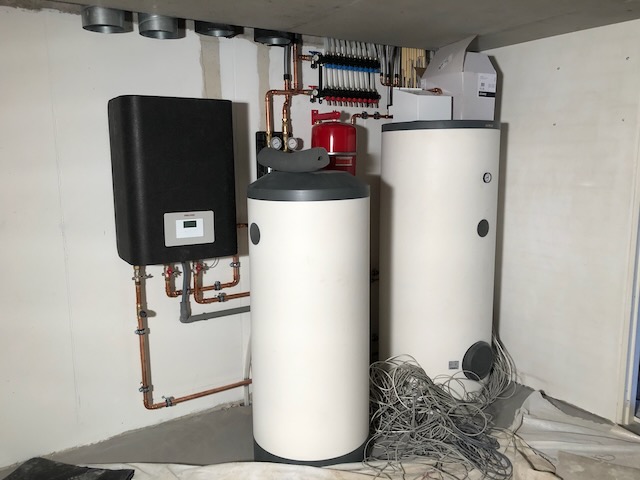
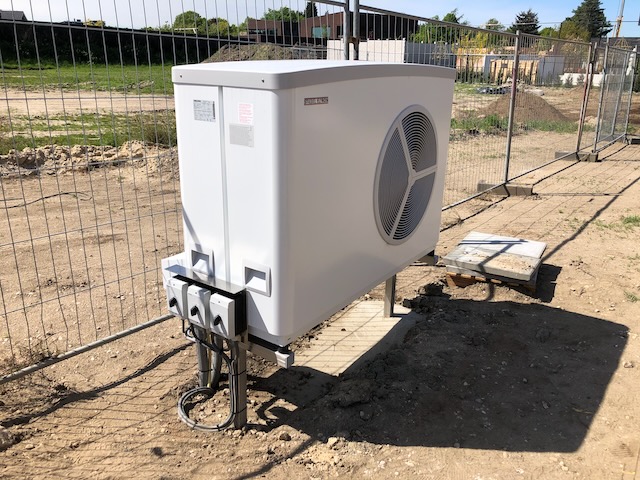
Our house (2020) is being heated and cooled by a Stiebel Eltron WPL20AC heatpump. Being a techy I searched if there was a possibility to extract some statistics out of the heat pump and connect it to my Home Assistant.

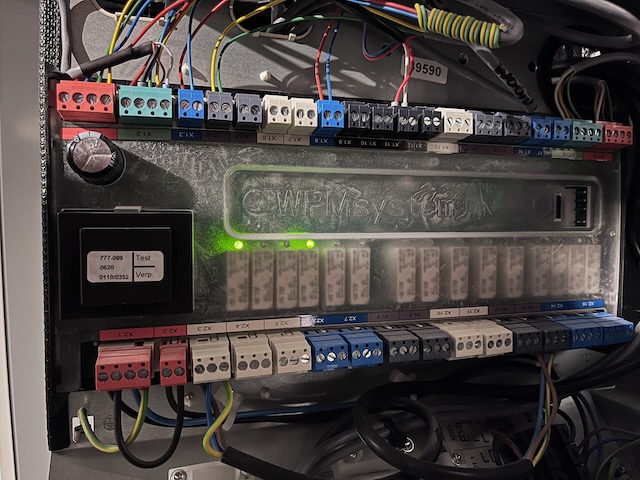
The pictures above show the system while being installed in the summer of 2020.

ISG web

Fast forward to 2024 and after some searching I found the ISG web from Stiebel Eltron.

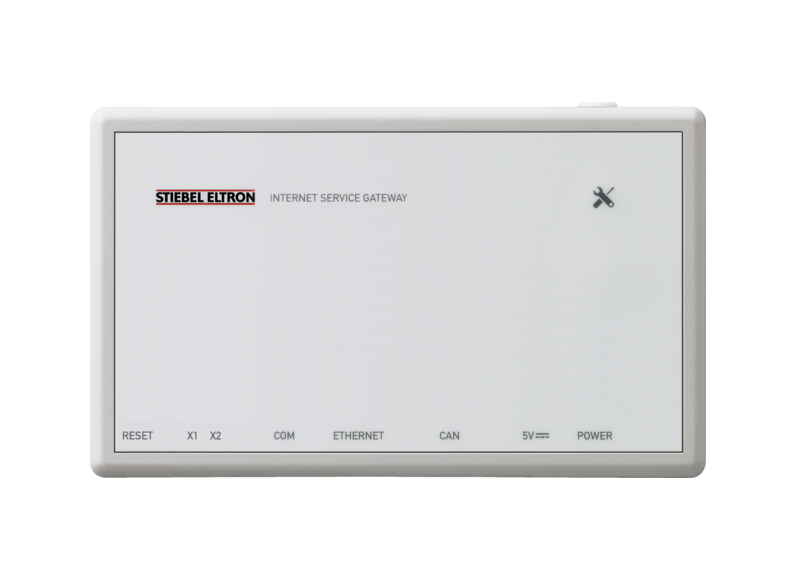
A device which connects to the CAN bus of the heatpump and exposes the information via a Web UI and additionally via Modbus TCP/IP (additional software required!).

I purchased a ISG web (EUR 170) and tried to connect it myself.

Stiebel Eltron ISG web

I thought it was a matter of connecting the Ethernet and then the CAN bus cable on the WPsystem board inside the heatpump. Turned out everything on the board was occupied and the manuals of Stiebel Eltron were not very clear.

CAN bus connection

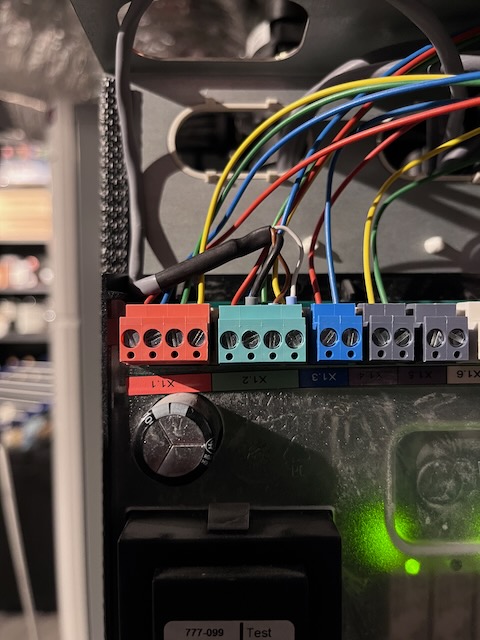
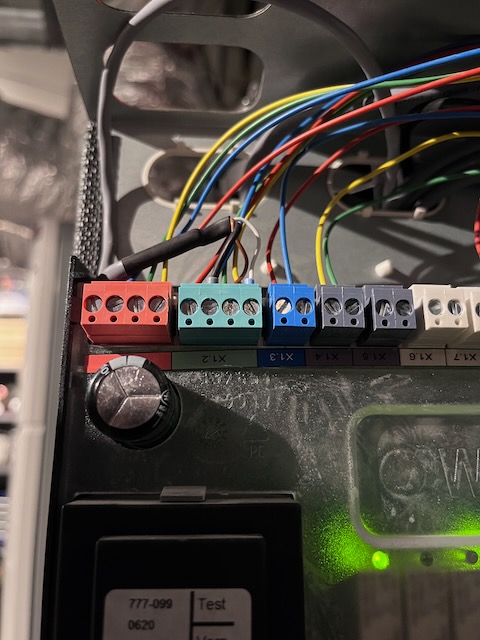
Luckily we had a servicemen come over for some maintenance on the heatpump and I asked him to connect the ISG to the WPsystem board. He did by connecting the cables to the GREEN (CAN B) connection X1.2.

Here you can see the grey cable coming from the ISG web connected to the X1.2 connector in parallel.

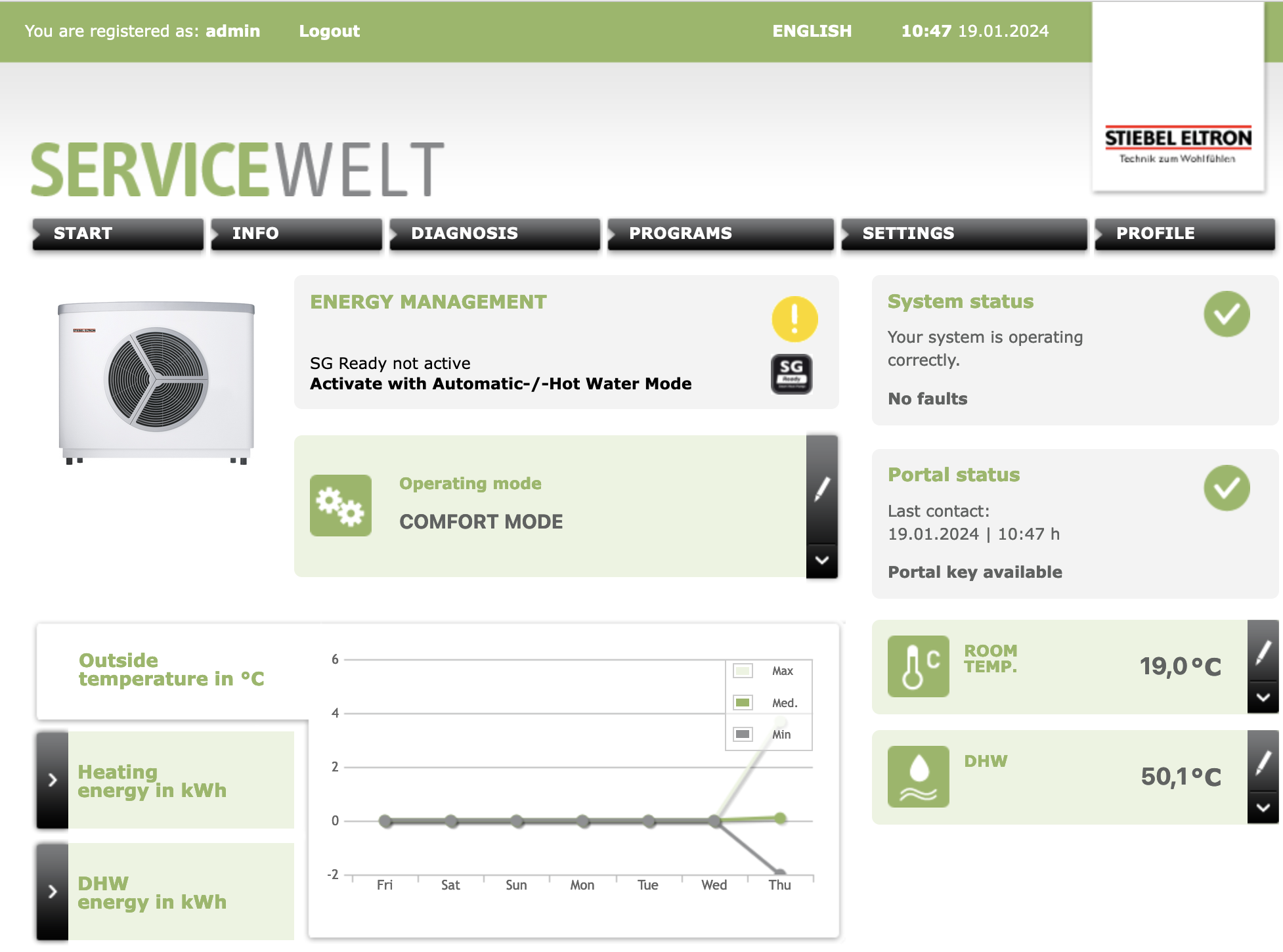
ISG web UI

The ISG is now working and I can see the information in the Web UI.

Modbus & Home Assistant

On my todo list is to connect the ISG web to my Home Assistant using the Stiebel Eltron integration.

The Modbus TCP/IP port 502 doesn’t seem to respond on my ISG, but this might be due to the stock firmware 12.2.3 build 260 it was delivered with.

I have sent an e-mail to Stiebel Eltron asking them for advice to have Modbus enabled on my ISG. Once I know more I will update this post.

EVPN+BGP+VXLAN between JunOS and FRR (with Cumulus)

Recently I was asked to assist with setting up a BGP+EVPN+VXLAN network where Juniper MX204 routers would be the gateways in the VNI and the rest of the network would consist of Spine and Leaf switches running Cumulus Linux.

The actual workload would run on Proxmox servers which would also run Frrouting. I wrote a post about this earlier.

I’ll make this a short post as you are probably reading this to find a solution to your problem, I’ll make it short and post the configuration.

Interoperability

BGP and EVPN are standardised protocols and they should work between vendors. EVPN is however still fairly new and vendors sometimes implement features differently.

I noticed this with the route-targets/communities set by FRR and JunOS for EVPN routes. These would not match and thus JunOS and FRR would not learn eachothers EVPN routes.

Solution / Configuration

In this case the solution was to set the route-target/community/vrf-target for all EVPN routes (and thus VNI) to 100:100 (something I chose).

JunOS

wido@juniper-mx204> show configuration routing-instances evpn 
instance-type virtual-switch;
protocols {
    evpn {
        encapsulation vxlan;
        extended-vni-list all;
        multicast-mode ingress-replication;
    }
}
vtep-source-interface lo0.0;
bridge-domains {
    v1500 {
        vlan-id none;
        routing-interface irb.1500;
        vxlan {
            vni 1500;
            ingress-node-replication;
        }
    }
    v1501 {
        vlan-id none;
        routing-interface irb.1501;
        vxlan {
            vni 1501;
            ingress-node-replication;
        }
    }
}
route-distinguisher 10.255.0.1:100;
vrf-target target:100:100;

wido@juniper-mx204>

frrouting

router bgp 65118
 no bgp ebgp-requires-policy
 no bgp default ipv4-unicast
 no bgp network import-check
 neighbor upstream peer-group
 neighbor upstream remote-as external
 neighbor enp129s0f0np0 interface peer-group upstream
 neighbor enp129s0f1np1 interface peer-group upstream
 !
 address-family ipv4 unicast
  network 10.255.0.17/32
  neighbor upstream activate
 exit-address-family
 !
 address-family ipv6 unicast
  network 28xx:xxx::17/128
  neighbor upstream activate
 exit-address-family
 !
 address-family l2vpn evpn
  neighbor upstream activate
  advertise-all-vni
  vni 1500
   route-target import 100:100
   route-target export 100:100
  exit-vni
  vni 1499
   route-target import 100:100
   route-target export 100:100
  exit-vni
  vni 1498
   route-target import 100:100
   route-target export 100:100
  exit-vni
  advertise-svi-ip
 exit-address-family
exit

This now resulted in JunOS and Frr learning the EVPN routes and this then also showed in the EVPN database of JunOS. The VMs in Proxmox were now able to reach the internet!

wido@juniper-mx204> show evpn database l2-domain-id 1500 
Instance: evpn
VLAN  DomainId  MAC address        Active source                  Timestamp        IP address
     1500       00:00:5e:00:01:01  05:00:00:fd:e9:00:00:05:dc:00  May 22 06:57:59  xx.124.220.3
     1500       00:00:5e:00:02:01  05:00:00:fd:e9:00:00:05:dc:00  May 22 06:57:59  xx:xx:2::3
     1500       46:50:13:6d:5d:bb  10.255.0.17                    May 23 05:44:20
     1500       74:e7:98:30:8c:e0  irb.1500                       May 18 06:29:04  xx.124.220.1
                                                                                   xx:xx:2::1
                                                                                   fe80::76e7:9805:dc30:8ce0
     1500       80:db:17:eb:d5:d0  10.255.0.2                     May 22 06:57:59  xx.124.220.2
                                                                                   xx:xx:2::2
                                                                                   fe80::82db:1705:dceb:d5d0
     1500       9a:9a:94:80:1a:3a  10.255.0.17                    May 23 06:02:25
     1500       ca:f0:03:fe:d6:dd  10.255.0.17                    May 22 18:18:43
     1500       f6:db:10:b6:5b:c4  10.255.0.17                    May 23 05:58:39  xx.124.220.6

wido@juniper-mx204>