From Middelburg to Trondheim

To Hirtshals

Last Saturday we left at 08:00 from Middelburg for the 1.100km drive to Hirtshals, Denmark. From there we would take the ferry to Larvik, Norway on Sunday morning.

It took us 14 hours to reach Hirtshals. Traffic was bad, very bad starting at Hamburg towards the border. Roadworks and border controls made it stop and go over almost 100km!

A short night followed since our ferry left at 08:00.

Lier South SuperCharger

After arriving in Larvik our first SuperCharger in Norway was Lier South, 100km from Larvik.

It was busy! After we parked all 8 stalls are occupied. Other Model S had to wait in the queue.
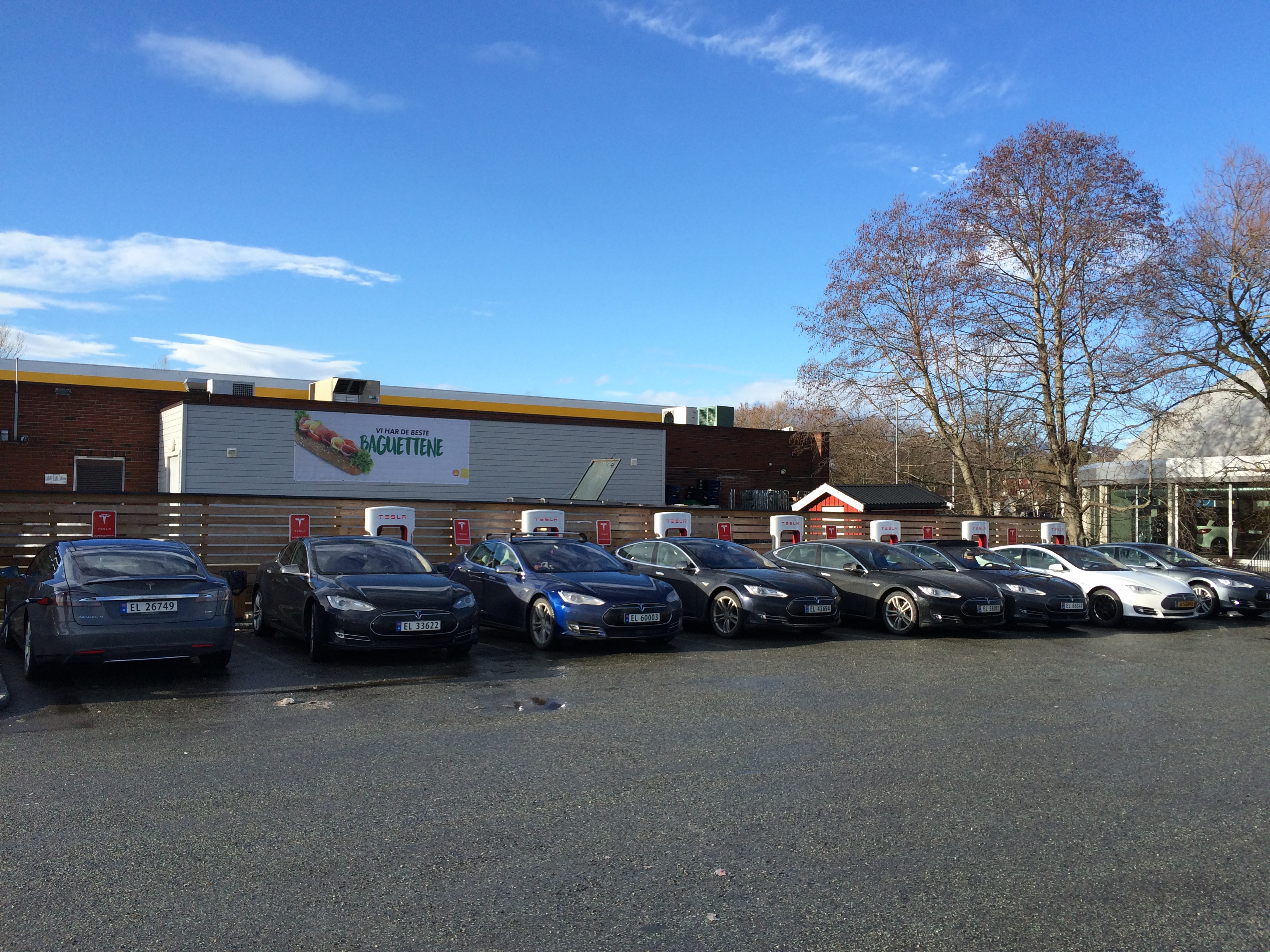
Lier South SuperCharger

A queue is bad, but it also shows that the infrastructure is used! It’s not a charger which is rarely used. From what I understood it was also a vacation period, so that might have caused the spike in traffic.

Lillehammer

After charging in Lier we headed to Lillehammer. We would stay the night there and charge again.

Fortum CHAdeMO

While heading to Lillehammer I stopped at a CHAdeMO from Fortum to see if I could charge there. The people from Fortum told me that I could use my Dutch phone and send a SMS to active it.

Well, that didn’t work. I borrowed a RFID tag from somebody else as a backup. On the Lofoten Islands I will need to use a Fortum charger, so I wanted to know if it worked. Lesson learned. It doesn’t.

Fortum CHAdeMO charger

Busy times at Lillehammer

On the E6 to Lillehammer we already spotted a lot of Model S coming from Lillehammer, so I expected the SuperCharger to be crowded.

It was! 9 of the 10 stalls we busy, so we parked at the last stall available.

As we were charging we saw more Model S arrive. We still had 100km left in the battery and we would leave the next morning. We vacated the stall and to decided to charge the next morning for the 155km drive to Dombas and Trondheim.

We checked in at the hotel and went for a dinner in Lillehammer.

SuperCharging with a cold battery

The next morning the car had been in -8C for the night. When I switched to ‘Drive’ a warning indicated that regenerative braking had been disabled. This was due to the battery being cold.

SuperCharging didn’t go very fast. When I just started it would charge with 17kW and slowly climbed to roughly 30kW before we had enough to leave for Dombas.

This was a similar experience as last year at the Krokom SuperCharger in -22C.

The picture below shows that we were charging with 24kW where under normal conditions it should have been about 80kW.
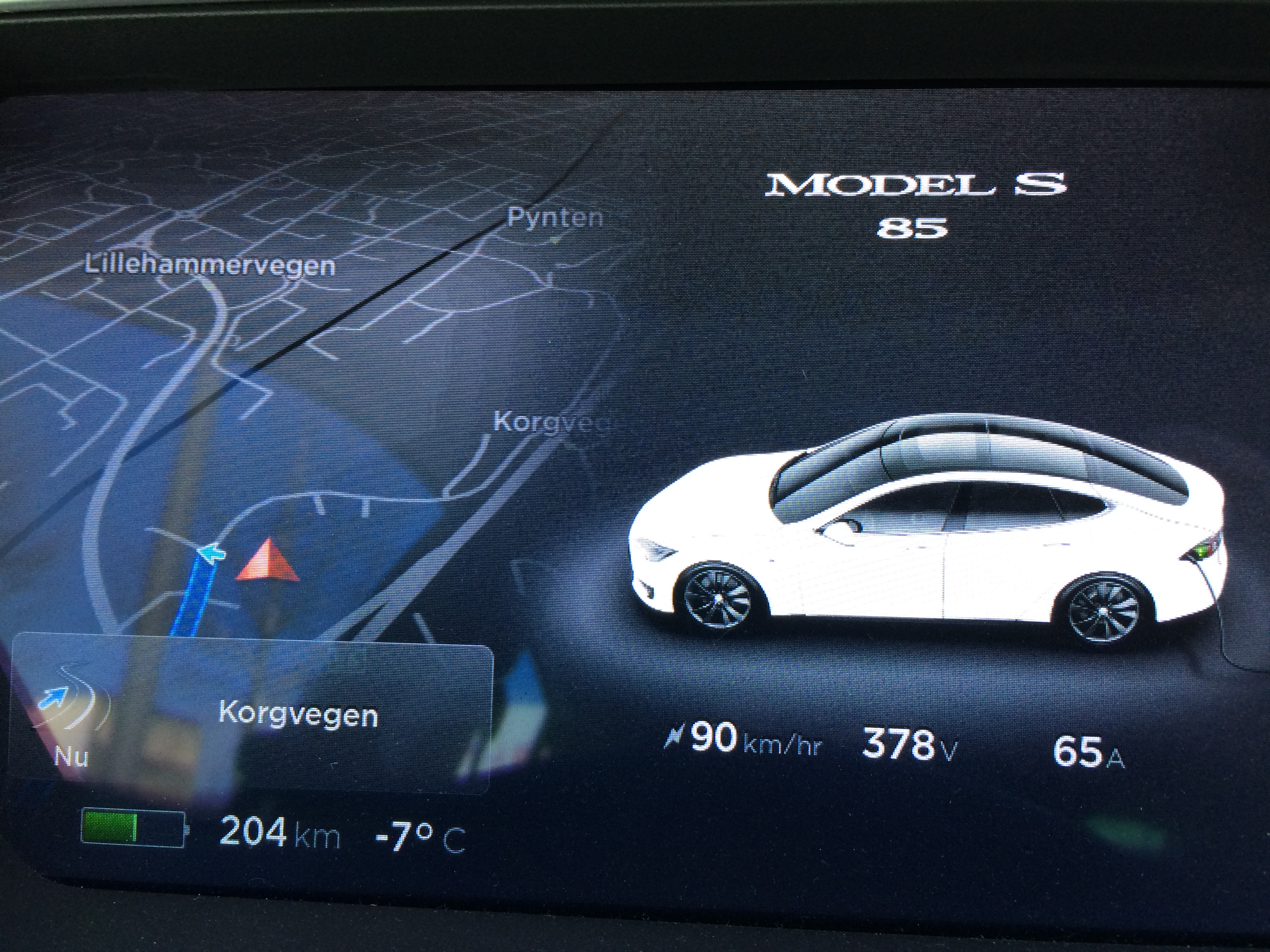
Slow Lillehammer SuperCharger

To Trondheim

From Lillehammer we drove to the Dombas SuperCharger. After a charge and lunch there we headed down to Klett (near Trondheim).

Nothing really special on this part of the trip. The temperature was about -5C and the (road) conditions were good.

To the Lofoten

Our destination is a house we rented through Airbnb on the Lofoten Islands.

From Trondheim we are taking the Hurtigruten ferry to Stamsund on the Lofoten. This will take 2 days.

From Stamsund to the house it is just 21km. Time to relax!

Energy Consumption

The tripmeter shows 1861km and a total usage of 391kWh. That’s 210Wh/km. Not bad at all!

MariaDB Galera cluster on IPv6

MariaDB Galera

I try to set as much IPv6-only infrastructure as possible and the same goes for a new MariaDB Galera cluster I had to build.

According to the release notes MariaDB 10.1 should have IPv6 support, but it didn’t work out for me. I wouldn’t get my Galera cluster to work over IPv6-only.

Galera

I tracked the root-cause down to Galera not parsing the addresses properly and it had to be tweaked a bit.

Configuration

With the configuration posted below I was able to get a MariaDB 10.1 setup working on IPv6-only.

[mysqld]
query_cache_size=0
binlog_format=ROW
default-storage-engine=innodb
innodb_autoinc_lock_mode=2
innodb_doublewrite=1
query_cache_type=0

bind-address = ::

wsrep_on=ON
wsrep_provider=/usr/lib/galera/libgalera_smm.so

wsrep_cluster_name="ns01"
wsrep_cluster_address="gcomm://ns011.XXX.eu,ns012.XXX.nl,ns013.XXX.info"

wsrep_sst_method=rsync

wsrep_node_name="ns011"

wsrep_provider_options = "gmcast.listen_addr=tcp://[::]:4567; ist.recv_addr=[2a00:f10:121:XX:XX:a0ff:fe00:1bc7]:4568"
wsrep_node_address = "[2a00:f10:121:XX:XX:a0ff:fe00:1bc7]:4567"
wsrep_sst_receive_address = "[2a00:f10:121:XX:XX:a0ff:fe00:1bc7]:4444"

This resulted in the Galera cluster functioning properly on a IPv6-only network. It’s indeed a bit more configuration then with IPv4, but that will probably be resolved in a future release.

The MariaDB status properly shows being connected over IPv6:

MariaDB [(none)]> show status like 'wsrep_incoming_addresses';
+--------------------------+--------------------------------------------------------------------------------------------------------------------+
| Variable_name            | Value                                                                                                              |
+--------------------------+--------------------------------------------------------------------------------------------------------------------+
| wsrep_incoming_addresses | [2a00:f10:121:XX:XX:a0ff:fe00:1bc7]:3306,[2a00:f10:400:XX:XX:d8ff:fe00:2ef]:3306,[2a00:1d20:3:XX:XX:c01:3:53]:3306 |
+--------------------------+--------------------------------------------------------------------------------------------------------------------+
1 row in set (0.00 sec)

MariaDB [(none)]>

IPv6 Prefix Delegation on a Cisco 887VA behind a XS4All VDSL2 connection

XS4All connection

At the PCextreme office we have a XS4All VDSL2 connection which has native IPv6. We get a /48 from XS4All.

I wrote two earlier blogposts about getting the Cisco 887VA router setup which might be of interest before you continue reading:

IPv6 Prefix Delegation

From XS4All we get a /48 routed to our office using DHCPv6 Prefix Delegation. We are experimenting and testing with Docker at the office where we also want to test the IPv6 capabilities of Docker.

The goal was to sub-delegate /60 subnets out of a /56 towards clients internally. I had to figure out how to get this configured on Cisco IOS.

  • We get a /48 delegated from XS4All
  • The first /56 is used for our local networks (LAN, Guest and Servers)
  • The second /56 is used as a pool to delegate /60 subnets from

Sipcalc

To calculate the IPv6 subnets used the tool ‘sipcalc’. I needed to find the second /56 in our /48:

sipcalc -S 56 2001:980:XX::/48

The output is rather long, so I trimmed it a bit:

-[ipv6 : 2001:980:XX::/48] - 0

[Split network]
Network			- 2001:0980:XX:0000:0000:0000:0000:0000 -
			  2001:0980:XX:00ff:ffff:ffff:ffff:ffff
Network			- 2001:0980:XX:0100:0000:0000:0000:0000 -
			  2001:0980:XX:01ff:ffff:ffff:ffff:ffff
Network			- 2001:0980:XX:0200:0000:0000:0000:0000 -
			  2001:0980:XX:02ff:ffff:ffff:ffff:ffff
...
...
Network			- 2001:0980:XX:ff00:0000:0000:0000:0000 -
			  2001:0980:XX:ffff:ffff:ffff:ffff:ffff

-

In this case 2001:0980:XX:0100:0000:0000:0000:0000:/56 is the second /56 in our /48.

Cisco IOS

Some searching brought me to cisco.com which had some examples.

Eventually it was actually quite easy to get it working.

Configuration

You need a DHCPv6 pool inside the Cisco and tell it to start a DHCPv6 server on the proper interface.

ipv6 dhcp pool local-ipv6
 prefix-delegation pool local-ipv6-pd-pool lifetime 3600 1800
 dns-server 2001:888:0:6::66
 dns-server 2001:888:0:9::99
 domain-name pcextreme.nl
interface Vlan1
 ip address 192.168.5.1 255.255.255.0
 ip nat inside
 ip virtual-reassembly in
 ipv6 address xs4all-prefix ::1/64
 ipv6 enable
 ipv6 nd other-config-flag
 ipv6 nd ra interval 30
 ipv6 nd ra dns server 2001:888:0:6::66
 ipv6 nd ra dns server 2001:888:0:9::99
 ipv6 dhcp server local-ipv6 rapid-commit
 ipv6 mld query-interval 60
ipv6 local pool local-ipv6-pd-pool 2001:980:XX:100::/56 60

That’s all!

Asking for a Prefix

On my Ubuntu desktop I could now request a subnet:

wido@wido-desktop:~$ sudo dhclient -6 -P -v eth0
Internet Systems Consortium DHCP Client 4.2.4
Copyright 2004-2012 Internet Systems Consortium.
All rights reserved.
For info, please visit https://www.isc.org/software/dhcp/

Bound to *:546
Listening on Socket/eth0
Sending on   Socket/eth0
PRC: Soliciting for leases (INIT).
XMT: Forming Solicit, 0 ms elapsed.
XMT:  X-- IA_PD d5:68:28:08
XMT:  | X-- Request renew in  +3600
XMT:  | X-- Request rebind in +5400
XMT: Solicit on eth0, interval 1060ms.
RCV: Advertise message on eth0 from fe80::da67:d9ff:fe81:bcec.
RCV:  X-- IA_PD d5:68:28:08
RCV:  | X-- starts 1455279332
RCV:  | X-- t1 - renew  +900
RCV:  | X-- t2 - rebind +1440
RCV:  | X-- [Options]
RCV:  | | X-- IAPREFIX 2001:980:XX:100::/60
RCV:  | | | X-- Preferred lifetime 1800.
RCV:  | | | X-- Max lifetime 3600.
RCV:  X-- Server ID: 00:03:00:01:d8:67:d9:81:bc:f0
RCV:  Advertisement recorded.
PRC: Selecting best advertised lease.

As you can see I got 2001:980:XX:100::/60 delegated to my desktop.

IPv6 routes

After I asked for a subnet on my desktop this is how the routes look like. You can see a /60 being routed to my Link-Local Address.

firewall-vdsl-veldzigt#show ipv6 route
IPv6 Routing Table - default - 8 entries
Codes: C - Connected, L - Local, S - Static, U - Per-user Static route
       B - BGP, HA - Home Agent, MR - Mobile Router, R - RIP
       H - NHRP, D - EIGRP, EX - EIGRP external, ND - ND Default
       NDp - ND Prefix, DCE - Destination, NDr - Redirect, O - OSPF Intra
       OI - OSPF Inter, OE1 - OSPF ext 1, OE2 - OSPF ext 2, ON1 - OSPF NSSA ext 1
       ON2 - OSPF NSSA ext 2, la - LISP alt, lr - LISP site-registrations
       ld - LISP dyn-eid, a - Application
S   ::/0 [1/0]
     via Dialer0, directly connected
S   2001:980:XX::/48 [1/0]
     via Null0, directly connected
C   2001:980:XX::/64 [0/0]
     via Vlan1, directly connected
L   2001:980:XX::1/128 [0/0]
     via Vlan1, receive
C   2001:980:XX:1::/64 [0/0]
     via Vlan300, directly connected
L   2001:980:XX:1::1/128 [0/0]
     via Vlan300, receive
S   2001:980:XX:100::/60 [1/0]
     via FE80::C23F:D5FF:FE68:XX, Vlan1
L   FF00::/8 [0/0]
     via Null0, receive
firewall-vdsl-veldzigt#

The subnet is working now and I can use it to hand it out to my Docker containers.