Replacing the eMMC in my Tesla Model S

Tesla’s vehicles are awesome. I own a S85 from 2013 and a S100D from 2018. I’ve driven 260.000km and 70.000km with these two vehicles and I love it.

There is however a design flaw in the early Tesla models which can become a very expensive reparation if not performed in time.

Version of of the MCU (Media Control Unit) which was installed up until early 2018 in Tesla S/X runs and is a ticking time bomb.

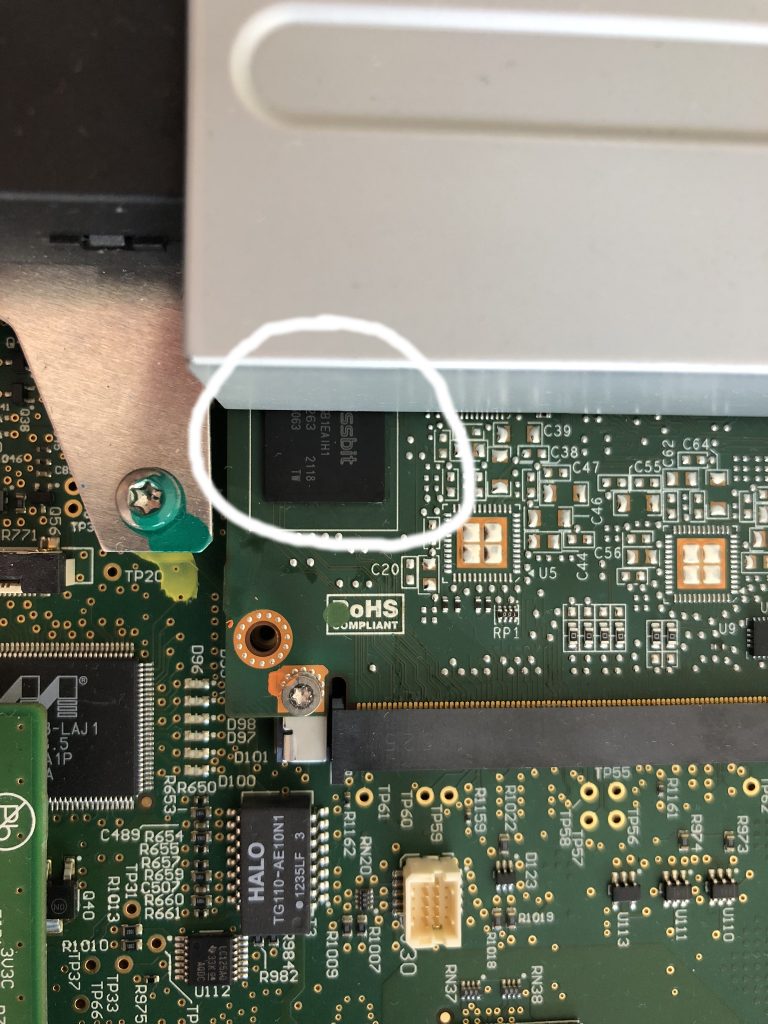
The problem is the Flash Memory (eMMC) which holds the Operating System of the computer. This wears out over time due to writing data to it.

Writing happens when you use the car. It caches Spotify, Google Maps and many more things. Even when the car is parked the MCU stays running and writes to the eMMC chip.

Eventually this chip will wear out. Before it does it becomes very slow and this results in the MCU becoming super sluggish, unresponsive, the screen reboots at random moments, bluetooth issues, etc, etc.
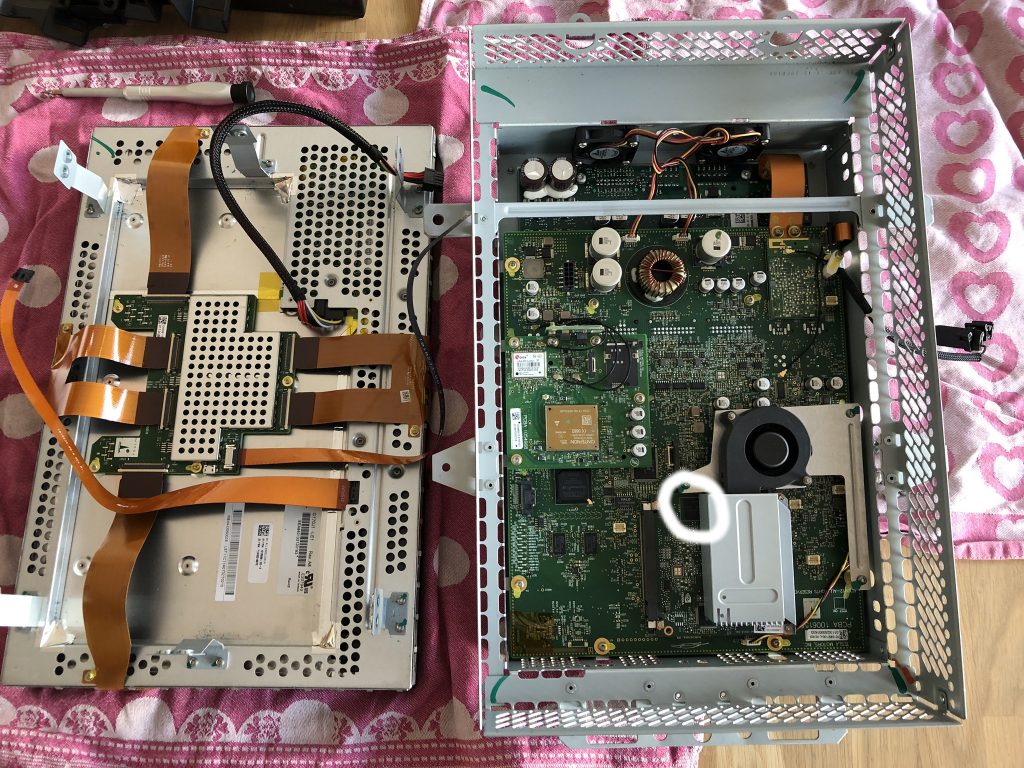
Inside of the Tesla MCU1
The eMMC chip

A lot has been written about this, so I won’t write to much. Short: Tesla will charge you around 2000 EUR/USD for a new MCU.

I choose to replace this eMMC chip myself and this was a lot cheaper! Total cost was <500 EUR.

Around the world there are a couple of companies doing these replacements. I replaced my eMMC chip together with Loek from Laadkabelwinke.nl (Netherlands): https://www.laadkabelwinkel.nl/tesla-mcu1-emmc-vervangen-reparatie

On Tesla Motors Club there are various topics about these replacements, one for example: https://teslamotorsclub.com/tmc/threads/preventive-emmc-replacement-on-mcu1.152489/

I highly recommend everybody with a Model S/X to replace this eMMC chip before it fails.

The chip will wear out and this causes all kinds of problems. I can’t stress this enough. Replace the chip before it’s too late!

In Europe I would recommend to go to Laadkabelwinkel.nl and have them replace the chip.

Enjoy your Tesla!

Creating a Management Routing Instance (VRF) on Juniper QFX5100

For a Ceph cluster I have two Juniper QFX5100 switches running as a Virtual Chassis.

This Virtual Chassis is currently only performing L2 forwarding, but I want to move this to a L3 setup where the QFX switches use Dynamic Routing (BGP) and thus become the gateway(s) for the Ceph servers.

This should work, but one of the things I was missing is a dedicated Management Port which uses a different routing table/instance.

Starting with JunOS 17.3R1 you can create a Management Routing Instance as described on the website of Juniper.

set system management-instance

This now creates the Routing Instance called mgmt_junos.

I try to run as much as possible IPv6-only or at least prefer IPv6 over IPv4.

I ran into the problem that configuring an IPv6 address on my em0 interface just wouldn’t work. It kept saying that the IPv6 address was Duplicate.

This is probably something which happens because both QFX switches are connected to the same Out of Band switch and causes it to receive it’s DAD over a different link. I had to disable DAD on interface em0 to make it work.

In addition I configured all DNS lookups to be performed using this routing instance.

The end result for my configuration (snippets):

system {
management-instance;
name-server {
2a00:f10:ff04:153::53 routing-instance mgmt_junos;
2a00:f10:ff04:253::53 routing-instance mgmt_junos;
93.180.70.22 routing-instance mgmt_junos;
93.180.70.30 routing-instance mgmt_junos;
}
}
interfaces {
unit 0 {
family inet {
address 172.17.5.10/24;
}
family inet6 {
address 2a00:f10:XXX:XXX::100/64
dad-disable;
}
}
}
routing-instances {
mgmt_junos {
routing-options {
rib mgmt_junos.inet6.0 {
static {
route ::/0 next-hop 2a00:f10:XXX:XXX::1;
}
}
static {
route 0.0.0.0/0 next-hop 172.17.5.1;
}
}
}
}

This now allows me to SSH to my Juniper QFX Virtual Chassis over interface em0 which uses a different routing instance/table.

Should I make a mistake in the default routing instance, for example a BGP misconfiguration, I can still SSH to my switch(es).

Or if there is a routing error (BGP issue) I can also still reach the switches.

Allowing SSH login for user without a password

To start with: This is something you should NOT use in most cases. It’s only intended to be used in very specific situations.

In my situation I want to allow some remote systems to create a reverse SSH tunnel without a password nor a key. It’s for hobby purposes and through firewalling I make sure that only those systems are allowed to connect to my ‘SSH proxy’.

I started by creating a group and a few users with that as their primary group:

groupadd reversessh
useradd -G reversessh user1
useradd -G reversessh user2
useradd -G reversessh user3
passwd -d user1
passwd -d user2
passwd -d user3

I then modified my /etc/ssh/sshd_config that it only allows specific groups and allows users with an empty password:

PermitEmptyPasswords yes
AllowGroups root reversessh

I also needed to modify PAM to make sure it allows this login. Therefor you need to modify /etc/pam.d/common-auth that it contains:

auth    [success=1 default=ignore]      pam_unix.so nullok

After I restarted SSH to users user1 until user3 were able to log on without a password nor a key.

Is this very secure? No! But it does serve a purpose in some use-cases.