Linux bridging with Virtual Machines and pure L3 routing and BGP

For those who have followed my in the last few years know that I am a big fan of Layer 3 routing, BGP, VXLAN and EVPN. In networks I design I try to eliminate the use of Layer 2 as much as possible.

Although I think VXLAN is great, it still creates a virtual Layer 2 domain where hosts exist. Multicast and broadcast traffic are still required for Neighbor Discovery in IPv6 and ARP in IPv4. This is not always ideal. EVPN is also not simple, as it can be complex to set up and maintain. Even so, I would choose EVPN with VXLAN over any Layer 2 network any day.

Layer 3 routing


My goal was to see if I could remove Layer 2 entirely and use pure Layer 3 routing for my virtual machines. This requires routing single host IPv4 and IPv6 addresses directly to the virtual machines, without any shared Layer 2 domain.

I came across Redistribute Neighbor in Cumulus Linux, which uses a Python daemon called rdnbrd. This daemon intercepts IPv4 ARP packets from hosts and injects them as single host IPv4 routes into the BGP routing table.

Could this also work for virtual machines and with IPv6? Yes!

Over several months I spoke with various people at conferences, read a number of online articles and used these pieces of information to build a working prototype on my Proxmox server, which runs BGP.

/32 and /128 towards a VM

In the end it wasn’t that difficult. I started with creating a Linux bridge on my Proxmox node where I would configure two addresses, 169.254.0.1/32 for IPv4 and fe80::1/64 for IPv6. This is how it looks like in the /etc/network/interfaces file.

auto vmbr1
iface vmbr1 inet static
    address 169.254.0.1/32
    address fe80::1/64
    bridge-ports none
    bridge-stp off
    bridge-fd 0

The webserver running this WordPress blog was reconfigured and attached to this bridge. Inside the Virtual Machine there is Ubuntu Linux with netplan and this is what I ended up configuring in /etc/netplan/network.yaml

network:
  ethernets:
    ens18:
      accept-ra: no
      nameservers:
          addresses:
              - 2620:fe::fe
              - 2620:fe::9
      addresses:
              - 2.57.57.30/32
              - 2001:678:3a4:100::80/128
      routes:
      - to: default
        via: fe80::1
      - to: default
        via: 169.254.0.1
        on-link: true
  version: 2

Here you can see that I configured two addresses (2.57.57.30/32 and 2001:678:3a4:100::80/128) and manually configured the IPv4 and IPv6 gateways.

root@web01:~# fping 169.254.0.1
169.254.0.1 is alive
root@web01:~# fping6 fe80::1%ens18
fe80::1%ens18 is alive
root@web01:~#

The VM can reach both the gateways, great! You can also see that these are set as the default gateway and the addresses have been configured on the interface ens18.

root@web01:~# ip addr show dev ens18 scope global
2: ens18: <BROADCAST,MULTICAST,UP,LOWER_UP> mtu 1500 qdisc fq_codel state UP group default qlen 1000
    link/ether 52:02:45:76:d2:35 brd ff:ff:ff:ff:ff:ff
    altname enp0s18
    inet 2.57.57.30/32 scope global ens18
       valid_lft forever preferred_lft forever
    inet6 2001:678:3a4:100::80/128 scope global 
       valid_lft forever preferred_lft forever
root@web01:~# 
root@web01:~# ip -6 route show
::1 dev lo proto kernel metric 256 pref medium
2001:678:3a4:100::80 dev ens18 proto kernel metric 256 pref medium
fe80::/64 dev ens18 proto kernel metric 256 pref medium
default via fe80::1 dev ens18 proto static metric 1024 pref medium
root@web01:~# ip -4 route show
default via 169.254.0.1 dev ens18 proto static onlink 
root@web01:~# 

Routing on the Proxmox node

On the Proxmox node I now needed to add these routes and the Neighbors into the ARP (IPv4) and NDP (IPv6) tables based on the MAC address, this resulted in these commands to be executed:

ip -6 route add 2001:678:3a4:100::80/128 dev vmbr1
ip -6 neigh add 2001:678:3a4:100::80 lladdr 52:02:45:76:d2:35 dev vmbr1 nud permanent
ip -4 route add 2.57.57.30/32 dev vmbr1
ip -4 neigh add 2.57.57.30 lladdr 52:02:45:76:d2:35 dev vmbr1 nud permanent

It required manual execution of these commands, but for a production environment you would need to have some form of automation who does this for you.

On my Proxmox node there is the FRRouting BGP daemon running which now picks up these routes and advertises them to the upstream router:

hv-138-a12-26# sh bgp neighbors 2001:678:3a4:1::50 advertised-routes 2001:678:3a4:100::80/128
BGP table version is 25, local router ID is 2.57.57.4, vrf id 0
Default local pref 100, local AS 212540
BGP routing table entry for 2001:678:3a4:100::80/128, version 22
Paths: (1 available, best #1, table default)
  Advertised to non peer-group peers:
  2001:678:3a4:1::50
  Local
    :: from :: (2.57.57.4)
      Origin incomplete, metric 1024, weight 32768, valid, sourced, best (First path received)
      Last update: Fri Nov 28 22:52:35 2025

Total number of prefixes 1
hv-138-a12-26# sh ip bgp neighbors 2001:678:3a4:1::50 advertised-routes 2.57.57.30/32
BGP table version is 11, local router ID is 2.57.57.4, vrf id 0
Default local pref 100, local AS 212540
BGP routing table entry for 2.57.57.30/32, version 9
Paths: (1 available, best #1, table default)
  Advertised to non peer-group peers:
  2001:678:3a4:1::50
  Local
    0.0.0.0 from 0.0.0.0 (2.57.57.4)
      Origin incomplete, metric 0, weight 32768, valid, sourced, best (First path received)
      Last update: Fri Nov 28 22:52:47 2025

Total number of prefixes 1
hv-138-a12-26#

This makes the upstream aware of these routes and establishes connectivity.

VM mobility

This example is just a single Proxmox node, but this could easily work in a clustered environment. Using automation you would need to make sure the routes and ARP/NDP entries ‘follow’ the VM as it migrates to a different host.

This could be achieved using Hookscripts in Proxmox for example, but this is something I haven’t researched.

This blogpost is primarily to show that this is technically possible and it’s up to you on how to implement this into your environment should you want to do so.
Routing IPv6 through Wireguard with MikroTik and Debian

Recently, I became a RIPE member, which resulted in an IPv6 /29 subnet being allocated to me. One of my main goals was to route a /48 from this /29 to my home, allowing me to use my own IPv6 addresses on my local network.

However, my ISP (Ziggo Zakelijk) does not allow me to announce my own IPv6 address space. Instead, they have statically assigned me a /48 subnet (2001:41f0:6f67::/48) as part of my business account.

Regardless, I wanted the flexibility to switch ISPs in the future without the hassle of renumbering my home network. And, of course, it’s also a fun technical challenge to get this working! Geeky stuff!

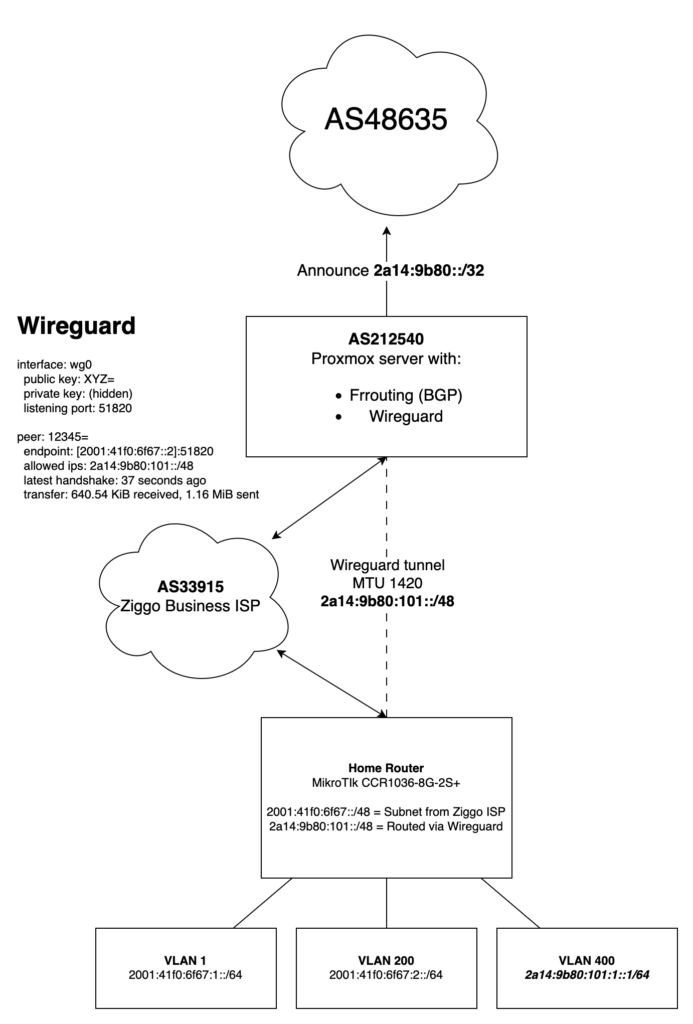
Wireguard from AS212540

In a datacenter in Amsterdam, I have a Dell R430 server running Proxmox, where I also run the FRRouting (FRR) daemon to announce AS212540.

ipv6 route 2a14:9b80::/32 Null0
ip router-id 2.57.57.4
!
router bgp 212540

address-family ipv6 unicast
redistribute kernel
redistribute connected
redistribute static
neighbor upstream-v6 activate
neighbor upstream-v6 soft-reconfiguration inbound
neighbor upstream-v6 route-map upstream-in in
neighbor upstream-v6 route-map upstream-out out

My idea was to use WireGuard from this server to route a /48 to my Mikrotik CCR1036-8G-2S+ running at home. I would then be able to use parts of my own IPv6 space at home.

  • Route my own IPv6 /48 to my house
  • Use Wireguard from my Proxmox server in Amsterdam
  • Use IPv6 as the underlay under Wireguard
  • Use as little configuration as possible

Turned out that WireGuard as super easy to get up and running. In the end this was all the configuration I needed in /etc/wireguard/wg0.conf

[Interface]
Address = 2a14:9b80:0:1::1/64
ListenPort = 51820
PrivateKey = THISISMYPRIVATEKEY

[Peer]
PublicKey = PUBLICKEYOFMIKROTIK
AllowedIPs = 2a14:9b80:101::/48
Endpoint = [2001:41f0:6f67::2]:51820

There are plenty of tutorials online on how to set up WireGuard and generate the necessary keys. Instead, I want to show how I built an IPv6-only environment. No NAT, just pure routing!

If you look closely you can spot a few things

  • 2001:41f0:6f67::2 is the WAN IP of my MikroTik router at home
  • 2a14:9b80:101::/48 is the subnet I’m routing towards my house via Wireguard

The BGP announcement on my Proxmox server already routes the /32 to the server. Setting up a WireGuard tunnel was all that was needed to ensure the routes propagated in the local routing table.

root@proxmox:~# ip -6 route show
blackhole 2001:678:3a4:100::/56 dev lo proto static metric 20 pref medium
2a14:9b80::/64 dev vmbr2 proto kernel metric 256 pref medium
2a14:9b80:0:1::/64 dev wg0 proto kernel metric 256 pref medium
2a14:9b80:101::/48 dev wg0 metric 1024 pref medium

blackhole 2a14:9b80::/32 dev lo proto static metric 20 pref medium
default via 2001:678:3a4:1::3 dev vmbr0 proto kernel metric 1024 onlink pref medium
root@proxmox:~#

For the completeness here is the output of the wg command:

interface: wg0
public key: IhYOkpqE0cIBclaR7zGLml/7BriPIMoMdjmM5dbkkGs=
private key: (hidden)
listening port: 51820

peer: ZZkW3L0OES1bqQKdDpe3GQ88G4I3ABZVasuEVyvS5iM=
endpoint: [2001:41f0:6f67::2]:51820
allowed ips: 2a14:9b80:101::/48
latest handshake: 1 second ago
transfer: 642.48 KiB received, 1.17 MiB sent

Source based routing

Since my home network already has native IPv6 through my ISP, I needed to make sure that only specific traffic was routed outbound via the WireGuard tunnel.

Typically, routing is based on the destination address, but in cases like this, it’s necessary to route based on the source address and sometimes the destination address as well.

In MikroTik, this is known as Policy Routing, which allows for this level of control. It took me a few hours to figure out, and I also discovered that I needed RouterOS 7.18, as earlier versions did not support this setup properly.

Eventually this is the configuration I ended up with, from which I will only show the relevant parts:

/interface wireguard
add listen-port=51820 mtu=1420 name=wg-hrl23
/interface wireguard peers
add allowed-address=::/0 endpoint-address=2001:678:3a4:1::100 endpoint-port=51820 interface=wg-hrl23 name=peer1 persistent-keepalive=30s public-key="IhYOkpqE0cIBclaR7zGLml/7BriPIMoMdjmM5dbkkGs="

/routing table
add disabled=no fib name=wireguard

/ipv6 route
add comment="Ziggo Zakelijk" disabled=no dst-address=::/0 gateway=2001:41f0:6f67::1
add blackhole dst-address=2a14:9b80:101::/48
add disabled=no gateway=wg-hrl23 routing-table=wireguard

/ipv6 address
add address=2001:41f0:6f67::2 comment="Ziggo Zakelijk" interface=ether1
add address=2001:41f0:6f67:1::1 interface=bridgeLocal
add address=2a14:9b80:101::1 interface=wg-hrl23
add address=2a14:9b80:101:1::1 interface=ether4

/ipv6 firewall filter
add action=accept chain=input comment="Wireguard with proxmox01" dst-port=51820 in-interface-list=WAN protocol=udp src-address=2001:678:3a4:1::100/128

/routing rule
add action=lookup dst-address=2001:41f0:6f67::/48 src-address=2a14:9b80:101::/48 table=main
add action=lookup-only-in-table disabled=no src-address=2a14:9b80:101::/48 table=wireguard

The last two lines are the most important!

  • Traffic between my regular LAN and the subnet routed to my home via Wireguard should just be regular routed traffic
  • Otherwise the traffic should be diverted to the routing table “wireguard” which routes the traffic outbound via Wireguard

Diagram

To clarify a couple of things I have created a Diagram to hopefully explain how it all comes together.

I hope this explains and inspires you to do the same!

I became a RIPE LIR! :-)

Early 2025 I’ve decided to become a RIPE member with my own holding (BV, Netherlands) so I could obtain my own ASN and IPv6 PA space.

My goal was to obtain IPv6 space which I could use forever and knowing I would never have to renumber again. Initially I started with PI-space, but that’s limited to a /48.

A /48 is the smallest block you can announce on the internet and I wanted to have something larger, a /40 for example. This would allow me to announce my space from different ASN. As that wasn’t possible I choose to become a RIPE LIR.

On February 27th 2025 I was assigned:

I am currently announcing this ASN from a single Debian Linux (Proxmox) server (Dell R430) running behind AS48635 in Amsterdam.

ipv6 route 2a14:9b80::/32 Null0
ip router-id 2.57.57.4
!
router bgp 212540
...
address-family ipv6 unicast
redistribute kernel
redistribute connected
redistribute static
neighbor upstream-v6 activate
neighbor upstream-v6 soft-reconfiguration inbound
neighbor upstream-v6 route-map upstream-in in
neighbor upstream-v6 route-map upstream-out out
...

Using Wireguard VPN tunnels I’m routing parts of this subnet to my home(s) and other parts are being used for servers running on my Proxmox server in Amsterdam.

I choose to announce only a /32 and leave the rest free for future use.

More to follow on this topic!